
API Documentation
Introduction
The Stagetimer API enables you to remotely control your timer using scripts and tools like Bitfocus Companion or vMix. It offers both HTTP endpoints and a socket.io endpoint for real-time updates. All endpoints use GET requests — including mutations — for maximum compatibility with hardware controllers where "trigger a URL" is the simplest integration. Most endpoints interact with the currently selected timer, indicated by a blue background on the controller page.
The API is accessible with any paid license and is also available for the desktop app.
How to use this API
If you're new to APIs or programming, this page may seem confusing. An API (Application Programming Interface) allows two computer programs to communicate. For example, you can use this API with the Bitfocus Companion software. For a hands-on example, see: How to use Stagetimer with Companion for Streamdeck
This documentation uses curl in the code examples. curl is nice because you can just copy-paste the code examples into the command line interface of your computer to try them out. For Mac, use Terminal (How to open the terminal), and for Windows, use Command Prompt (How to open the command prompt).
If you are completely new to APIs then read "Understanding GET Requests and Query Parameters" and "Targeting Timers and Messages" at the end of this page.
Authentication
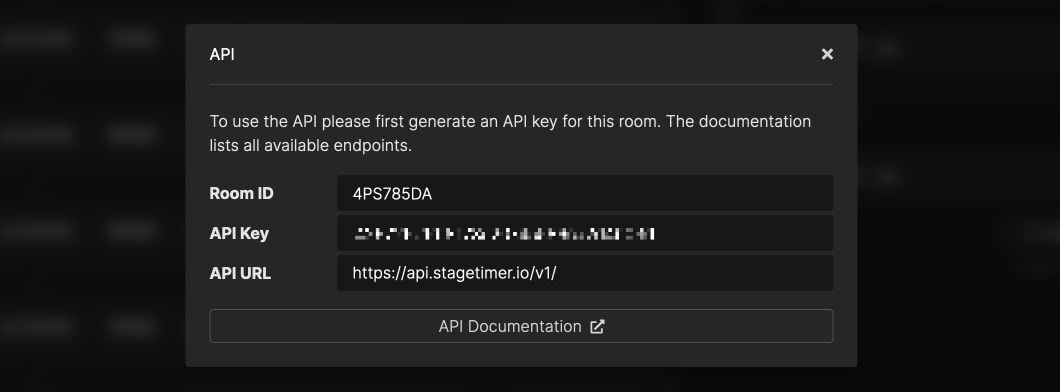
Stagetimer uses token-based authentication, requiring an API key generated on the controller page. Authenticate by sending your API key using the api_key query parameter, or send it as a "bearer token" in the HTTP Authorization header. All API requests must be authenticated and made over HTTPS.
curl "https://api.stagetimer.io/v1/test_auth?room_id=YOUR_ROOM_ID&api_key=YOUR_API_KEY"curl "https://api.stagetimer.io/v1/test_auth?room_id=YOUR_ROOM_ID" -H "Authorization: Bearer YOUR_API_KEY"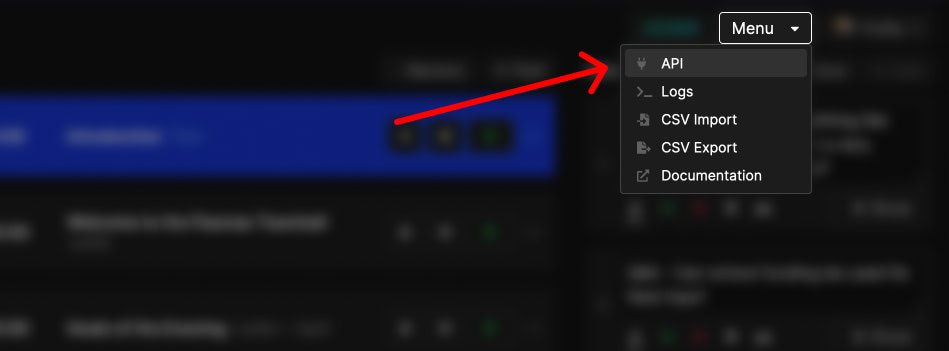
Getting Started
Here are a few common recipes to get you up and running quickly.
Read current playback state
To get the current playback state, make two calls. First, call get_status to get the playback state — which timer is selected, whether it's running or paused, and relevant timestamps.
curl "https://api.stagetimer.io/v1/get_status?room_id=YOUR_ROOM_ID&api_key=YOUR_API_KEY"Then call get_all_timers to get the full timer list with names, speakers, and labels.
curl "https://api.stagetimer.io/v1/get_all_timers?room_id=YOUR_ROOM_ID&api_key=YOUR_API_KEY"Cross-reference by matching playback_status.timer_id from the status response against the _id field in the timer array to find the currently selected timer.
Build a real-time display
For real-time updates, use the socket.io endpoint. Connect with your room_id and api_key, and you'll immediately receive the current state for all events on connection.
Listen for current_timer, next_timer, and playback_status events. The current_timer and next_timer events contain the full timer object (not just the ID), so you have everything you need — including the speaker field to personalize displays. See the code examples for implementation details.
Control playback from external software
Use the transport endpoints for basic playback control: /start, /stop, /next, and /previous. These operate on the currently selected timer.
To target a specific timer, use /start_timer?timer_id=X or /start_timer?index=1. See the full endpoint reference below for all available operations.
HTTP Endpoints
The OpenAPI spec for this API is available here: Download stagetimer-api-v1-spec.yaml. The API allows 100 requests per minute per room. Rate limit info is returned in standard RateLimit-* response headers.
General
Test API connection
GEThttps://api.stagetimer.io/v1/
The root endpoint can be used to verify the connection to the API. It responds with a greeting and a list of available routes.
Query parameters:
This endpoint doesn't accept query parameters.
curl "https://api.stagetimer.io/v1/"{
"ok": true,
"message": "This is the stagetimer.io Web API v1",
"data": {
"docs": "https://stagetimer.io/docs/api-v1/",
"routes": [
"/start",
"/stop",
"/next",
"/previous",
"..."
]
}
}General
Test API authorization
GEThttps://api.stagetimer.io/v1/test_auth
Used to verify that authorization is working. Returns a message confirming authorization.
Query parameters:
- room_id
- Required <string>Example:
6ADP4P5UID of the room you are targeting.
curl "https://api.stagetimer.io/v1/test_auth?room_id=YOUR_ROOM_ID&api_key=YOUR_API_KEY"{
"ok": true,
"message": "You are authorized to use the Stagetimer API for room: XYZABCDE"
}Room
Get playback status
GEThttps://api.stagetimer.io/v1/get_status
Get the playback status of the selected timer in the room. Returns timestamps, not a live countdown — your code must compute the remaining time locally. start, finish, and pause are timestamps in milliseconds since the Unix epoch. To compute the countdown: if running = true, use remaining = finish - Date.now(). If running = false (paused), use remaining = finish - pause. The total duration is finish - start. The playback_status socket event uses the same data and is emitted automatically on connect — if you use the socket, you don't need to call this endpoint separately.
Query parameters:
- room_id
- Required <string>Example:
6ADP4P5UID of the room you are targeting.
curl "https://api.stagetimer.io/v1/get_status?room_id=YOUR_ROOM_ID&api_key=YOUR_API_KEY"{
"ok": true,
"message": "Playback status loaded",
"data": {
"_model": "playback_status",
"_updated_at": "2023-05-01T08:40:06.463Z",
"timer_id": "63f59467d68bfdeef6b3bfc3",
"running": false,
"start": 1677055206453,
"finish": 1677055206453,
"pause": 1677055206453,
"server_time": 1677055206453
}
}Room
Get room
GEThttps://api.stagetimer.io/v1/get_room
Get the state of a room
Query parameters:
- room_id
- Required <string>Example:
6ADP4P5UID of the room you are targeting.
curl "https://api.stagetimer.io/v1/get_room?room_id=YOUR_ROOM_ID&api_key=YOUR_API_KEY"{
"ok": true,
"message": "Room loaded",
"data": {
"_id": "6ADP4P5U",
"_model": "room",
"_updated_at": "2023-05-01T08:40:06.463Z",
"name": "Main stage",
"blackout": false,
"focus_message": false,
"on_air": false,
"logo": "https://stagetimer.io/spa-assets/logo-dark.png",
"timezone": "Europe/Berlin"
}
}Room
Get logs
GEThttps://api.stagetimer.io/v1/get_logs
Get logs for past events in the room.
Query parameters:
- room_id
- Required <string>Example:
6ADP4P5UID of the room you are targeting. - limit
- Optional <integer>Default:
20Min:1Max:200Limit the requested amount of log messages. - offset
- Optional <integer>Default:
0Min:0Max:200Request log messages with this offset. Use this to paginate over the dataset.
curl "https://api.stagetimer.io/v1/get_logs?room_id=YOUR_ROOM_ID&api_key=YOUR_API_KEY"{
"ok": true,
"message": "Logs loaded",
"data": [
"2023-05-01T08:40:06.463Z | Device YCB7 | Added `1m` to timer. New value: `0:03:00`",
"..."
]
}Transport
Start
GEThttps://api.stagetimer.io/v1/start
Start/resume the highlighted timer in the room
Query parameters:
- room_id
- Required <string>Example:
6ADP4P5UID of the room you are targeting.
curl "https://api.stagetimer.io/v1/start?room_id=YOUR_ROOM_ID&api_key=YOUR_API_KEY"{
"ok": true,
"message": "Timer started at 0:01:00",
"data": {
"_model": "playback_status",
"_updated_at": "2023-05-01T08:40:06.463Z",
"timer_id": "63f59467d68bfdeef6b3bfc3",
"running": false,
"start": 1677055206453,
"finish": 1677055206453,
"pause": 1677055206453,
"server_time": 1677055206453
}
}Transport
Stop
GEThttps://api.stagetimer.io/v1/stop
Stop the highlighted timer in the room.
Query parameters:
- room_id
- Required <string>Example:
6ADP4P5UID of the room you are targeting.
curl "https://api.stagetimer.io/v1/stop?room_id=YOUR_ROOM_ID&api_key=YOUR_API_KEY"{
"ok": true,
"message": "Timer stopped at `0:00:30",
"data": {
"_model": "playback_status",
"_updated_at": "2023-05-01T08:40:06.463Z",
"timer_id": "63f59467d68bfdeef6b3bfc3",
"running": false,
"start": 1677055206453,
"finish": 1677055206453,
"pause": 1677055206453,
"server_time": 1677055206453
}
}Transport
Start/stop
GEThttps://api.stagetimer.io/v1/start_or_stop
Start OR stop the currently highlighted timer.
Query parameters:
- room_id
- Required <string>Example:
6ADP4P5UID of the room you are targeting.
curl "https://api.stagetimer.io/v1/start_or_stop?room_id=YOUR_ROOM_ID&api_key=YOUR_API_KEY"{
"ok": true,
"message": "Timer stopped at `0:00:30",
"data": {
"_model": "playback_status",
"_updated_at": "2023-05-01T08:40:06.463Z",
"timer_id": "63f59467d68bfdeef6b3bfc3",
"running": false,
"start": 1677055206453,
"finish": 1677055206453,
"pause": 1677055206453,
"server_time": 1677055206453
}
}Transport
Reset
GEThttps://api.stagetimer.io/v1/reset
Reset or restart the currently highlighted timer.
Query parameters:
- room_id
- Required <string>Example:
6ADP4P5UID of the room you are targeting. - autostart
- Optional <boolean>Default:
falseSet totrueto automatically start the timer after the action is triggered.
curl "https://api.stagetimer.io/v1/reset?room_id=YOUR_ROOM_ID&api_key=YOUR_API_KEY"{
"ok": true,
"message": "Timer _Timer 1_ reset (`0:00:30`)",
"data": {
"_model": "playback_status",
"_updated_at": "2023-05-01T08:40:06.463Z",
"timer_id": "63f59467d68bfdeef6b3bfc3",
"running": false,
"start": 1677055206453,
"finish": 1677055206453,
"pause": 1677055206453,
"server_time": 1677055206453
}
}Transport
Next
GEThttps://api.stagetimer.io/v1/next
Highlight the next timer in the list. Optionally, you can automatically start the next timer once it's highlighted.
Query parameters:
- room_id
- Required <string>Example:
6ADP4P5UID of the room you are targeting. - autostart
- Optional <boolean>Default:
falseSet totrueto automatically start the timer after the action is triggered.
curl "https://api.stagetimer.io/v1/next?room_id=YOUR_ROOM_ID&api_key=YOUR_API_KEY"{
"ok": true,
"message": "Next timer _Timer 1_ selected (`0:05:00`)",
"data": {
"_model": "playback_status",
"_updated_at": "2023-05-01T08:40:06.463Z",
"timer_id": "63f59467d68bfdeef6b3bfc3",
"running": false,
"start": 1677055206453,
"finish": 1677055206453,
"pause": 1677055206453,
"server_time": 1677055206453
}
}Transport
Previous
GEThttps://api.stagetimer.io/v1/previous
Reset the currently highlighted timer if it is running. If the highlighted timer is not running, highlight the previous timer in the list. Optionally, you can automatically start the previous timer once it's highlighted.
Query parameters:
- room_id
- Required <string>Example:
6ADP4P5UID of the room you are targeting. - autostart
- Optional <boolean>Default:
falseSet totrueto automatically start the timer after the action is triggered.
curl "https://api.stagetimer.io/v1/previous?room_id=YOUR_ROOM_ID&api_key=YOUR_API_KEY"{
"ok": true,
"message": "Previous timer _Timer 1_ selected (`0:01:00`)",
"data": {
"_model": "playback_status",
"_updated_at": "2023-05-01T08:40:06.463Z",
"timer_id": "63f59467d68bfdeef6b3bfc3",
"running": false,
"start": 1677055206453,
"finish": 1677055206453,
"pause": 1677055206453,
"server_time": 1677055206453
}
}Transport
Add time
GEThttps://api.stagetimer.io/v1/add_time
Add an amount of time to the highlighted timer in the room. Use either amount (time shorthand) or milliseconds (exact value).
Query parameters:
- room_id
- Required <string>Example:
6ADP4P5UID of the room you are targeting. - amount
- Optional <string>Example:
30sAn amount of time specified by a number followed by a divison of time. Eg.5sfor 5 seconds,10mfor 10 minutes, etc. - milliseconds
- Optional <integer>Example:
30000Time value in milliseconds.
curl "https://api.stagetimer.io/v1/add_time?room_id=YOUR_ROOM_ID&api_key=YOUR_API_KEY"{
"ok": true,
"message": "Added 30s to timer. New countdown: `0:01:30`",
"data": {
"_model": "playback_status",
"_updated_at": "2023-05-01T08:40:06.463Z",
"timer_id": "63f59467d68bfdeef6b3bfc3",
"running": false,
"start": 1677055206453,
"finish": 1677055206453,
"pause": 1677055206453,
"server_time": 1677055206453
}
}Transport
Subtract time
GEThttps://api.stagetimer.io/v1/subtract_time
Subtract an amount of time from the highlighted timer in the room. Use either amount (time shorthand) or milliseconds (exact value).
Query parameters:
- room_id
- Required <string>Example:
6ADP4P5UID of the room you are targeting. - amount
- Optional <string>Example:
30sAn amount of time specified by a number followed by a divison of time. Eg.5sfor 5 seconds,10mfor 10 minutes, etc. - milliseconds
- Optional <integer>Example:
30000Time value in milliseconds.
curl "https://api.stagetimer.io/v1/subtract_time?room_id=YOUR_ROOM_ID&api_key=YOUR_API_KEY"{
"ok": true,
"message": "Subtracted 30s from timer. New countdown: `0:01:00`",
"data": {
"_model": "playback_status",
"_updated_at": "2023-05-01T08:40:06.463Z",
"timer_id": "63f59467d68bfdeef6b3bfc3",
"running": false,
"start": 1677055206453,
"finish": 1677055206453,
"pause": 1677055206453,
"server_time": 1677055206453
}
}Transport
Jump playhead
GEThttps://api.stagetimer.io/v1/jump
Jump the playhead forward (positive value) or backward (negative value) by the specified number of milliseconds. Cannot jump beyond the start position of the timer.
Query parameters:
- room_id
- Required <string>Example:
6ADP4P5UID of the room you are targeting. - milliseconds
- Required <integer>Example:
30000Time value in milliseconds.
curl "https://api.stagetimer.io/v1/jump?room_id=YOUR_ROOM_ID&milliseconds=30000&api_key=YOUR_API_KEY"{
"ok": true,
"message": "Jumped forward 30s. New countdown: `0:01:30`",
"data": {
"_model": "playback_status",
"_updated_at": "2023-05-01T08:40:06.463Z",
"timer_id": "63f59467d68bfdeef6b3bfc3",
"running": false,
"start": 1677055206453,
"finish": 1677055206453,
"pause": 1677055206453,
"server_time": 1677055206453
}
}Viewer
Flash the screen
GEThttps://api.stagetimer.io/v1/start_flashing
Flashes the screen in the room. Can be used to grab the attention of speakers.
Query parameters:
- room_id
- Required <string>Example:
6ADP4P5UID of the room you are targeting. - count
- Optional <integer>Example:
10Default:3Number of times to repeat the action. Accepted numbers:1-999.
curl "https://api.stagetimer.io/v1/start_flashing?room_id=YOUR_ROOM_ID&api_key=YOUR_API_KEY"{
"ok": true,
"message": "Triggered flashing (×5)"
}Viewer
Stop flashing
GEThttps://api.stagetimer.io/v1/stop_flashing
Stops any flashing timers and message on the screen.
Query parameters:
- room_id
- Required <string>Example:
6ADP4P5UID of the room you are targeting.
curl "https://api.stagetimer.io/v1/stop_flashing?room_id=YOUR_ROOM_ID&api_key=YOUR_API_KEY"{
"ok": true,
"message": "Stopped flashing"
}Viewer
Enable blackout mode
GEThttps://api.stagetimer.io/v1/enable_blackout
Enable blackout mode in the room
Query parameters:
- room_id
- Required <string>Example:
6ADP4P5UID of the room you are targeting.
curl "https://api.stagetimer.io/v1/enable_blackout?room_id=YOUR_ROOM_ID&api_key=YOUR_API_KEY"{
"ok": true,
"message": "Blackout mode enabled"
}Viewer
Disable blackout mode
GEThttps://api.stagetimer.io/v1/disable_blackout
Disable blackout mode in the room
Query parameters:
- room_id
- Required <string>Example:
6ADP4P5UID of the room you are targeting.
curl "https://api.stagetimer.io/v1/disable_blackout?room_id=YOUR_ROOM_ID&api_key=YOUR_API_KEY"{
"ok": true,
"message": "Blackout mode disabled"
}Viewer
Toggle blackout mode
GEThttps://api.stagetimer.io/v1/toggle_blackout
Toggle (enable OR disable) blackout mode in the room
Query parameters:
- room_id
- Required <string>Example:
6ADP4P5UID of the room you are targeting.
curl "https://api.stagetimer.io/v1/toggle_blackout?room_id=YOUR_ROOM_ID&api_key=YOUR_API_KEY"{
"ok": true,
"message": "Blackout mode toggled (enabled)"
}Viewer
Enable focus mode
GEThttps://api.stagetimer.io/v1/enable_focus
Enable focus mode in the room
Query parameters:
- room_id
- Required <string>Example:
6ADP4P5UID of the room you are targeting.
curl "https://api.stagetimer.io/v1/enable_focus?room_id=YOUR_ROOM_ID&api_key=YOUR_API_KEY"{
"ok": true,
"message": "Focus mode enabled"
}Viewer
Disable focus mode
GEThttps://api.stagetimer.io/v1/disable_focus
Disable focus mode in the room
Query parameters:
- room_id
- Required <string>Example:
6ADP4P5UID of the room you are targeting.
curl "https://api.stagetimer.io/v1/disable_focus?room_id=YOUR_ROOM_ID&api_key=YOUR_API_KEY"{
"ok": true,
"message": "Focus mode disabled"
}Viewer
Toggle focus mode
GEThttps://api.stagetimer.io/v1/toggle_focus
Toggle (enable OR disable) focus mode in the room
Query parameters:
- room_id
- Required <string>Example:
6ADP4P5UID of the room you are targeting.
curl "https://api.stagetimer.io/v1/toggle_focus?room_id=YOUR_ROOM_ID&api_key=YOUR_API_KEY"{
"ok": true,
"message": "Focus mode toggled (enabled)"
}Viewer
Enable on-air mode
GEThttps://api.stagetimer.io/v1/enable_on_air
Enable on-air mode in the room
Query parameters:
- room_id
- Required <string>Example:
6ADP4P5UID of the room you are targeting.
curl "https://api.stagetimer.io/v1/enable_on_air?room_id=YOUR_ROOM_ID&api_key=YOUR_API_KEY"{
"ok": true,
"message": "On-air mode enabled"
}Viewer
Disable on-air mode
GEThttps://api.stagetimer.io/v1/disable_on_air
Disable on-air mode in the room
Query parameters:
- room_id
- Required <string>Example:
6ADP4P5UID of the room you are targeting.
curl "https://api.stagetimer.io/v1/disable_on_air?room_id=YOUR_ROOM_ID&api_key=YOUR_API_KEY"{
"ok": true,
"message": "On-air mode disabled"
}Viewer
Toggle on-air mode
GEThttps://api.stagetimer.io/v1/toggle_on_air
Toggle (enable OR disable) on-air mode in the room
Query parameters:
- room_id
- Required <string>Example:
6ADP4P5UID of the room you are targeting.
curl "https://api.stagetimer.io/v1/toggle_on_air?room_id=YOUR_ROOM_ID&api_key=YOUR_API_KEY"{
"ok": true,
"message": "On-air mode toggled (enabled)"
}Timers
Start timer
GEThttps://api.stagetimer.io/v1/start_timer
Start/resume a specific timer in the room
Query parameters:
- room_id
- Required <string>Example:
6ADP4P5UID of the room you are targeting. - timer_id
- Optional <string>Example:
63f59467d68bfdeef6b3bfc3ID of the timer to target in the room. - index
- Optional <integer>Example:
2Index of a timer or message to target in a room. Note: Index is not zero-based, it starts at 1. Example: To target the second timer from the top, setindex=2
curl "https://api.stagetimer.io/v1/start_timer?room_id=YOUR_ROOM_ID&api_key=YOUR_API_KEY"{
"ok": true,
"message": "Timer started at 0:01:00",
"data": {
"_model": "playback_status",
"_updated_at": "2023-05-01T08:40:06.463Z",
"timer_id": "63f59467d68bfdeef6b3bfc3",
"running": false,
"start": 1677055206453,
"finish": 1677055206453,
"pause": 1677055206453,
"server_time": 1677055206453
}
}Timers
Stop timer
GEThttps://api.stagetimer.io/v1/stop_timer
Stop a specific timer in the room.
Query parameters:
- room_id
- Required <string>Example:
6ADP4P5UID of the room you are targeting. - timer_id
- Optional <string>Example:
63f59467d68bfdeef6b3bfc3ID of the timer to target in the room. - index
- Optional <integer>Example:
2Index of a timer or message to target in a room. Note: Index is not zero-based, it starts at 1. Example: To target the second timer from the top, setindex=2
curl "https://api.stagetimer.io/v1/stop_timer?room_id=YOUR_ROOM_ID&api_key=YOUR_API_KEY"{
"ok": true,
"message": "Timer stopped at `0:00:30",
"data": {
"_model": "playback_status",
"_updated_at": "2023-05-01T08:40:06.463Z",
"timer_id": "63f59467d68bfdeef6b3bfc3",
"running": false,
"start": 1677055206453,
"finish": 1677055206453,
"pause": 1677055206453,
"server_time": 1677055206453
}
}Timers
Start/stop a timer
GEThttps://api.stagetimer.io/v1/start_or_stop_timer
Toggle (start/stop) a specific timer in the room.
Query parameters:
- room_id
- Required <string>Example:
6ADP4P5UID of the room you are targeting. - timer_id
- Optional <string>Example:
63f59467d68bfdeef6b3bfc3ID of the timer to target in the room. - index
- Optional <integer>Example:
2Index of a timer or message to target in a room. Note: Index is not zero-based, it starts at 1. Example: To target the second timer from the top, setindex=2
curl "https://api.stagetimer.io/v1/start_or_stop_timer?room_id=YOUR_ROOM_ID&api_key=YOUR_API_KEY"{
"ok": true,
"message": "Timer stopped at `0:00:30",
"data": {
"_model": "playback_status",
"_updated_at": "2023-05-01T08:40:06.463Z",
"timer_id": "63f59467d68bfdeef6b3bfc3",
"running": false,
"start": 1677055206453,
"finish": 1677055206453,
"pause": 1677055206453,
"server_time": 1677055206453
}
}Timers
Select timer
GEThttps://api.stagetimer.io/v1/select_timer
Select (cue up) a specific timer without starting it. The timer becomes the active timer (blue highlight) with its playhead reset to the beginning. Alias for /reset_timer.
Query parameters:
- room_id
- Required <string>Example:
6ADP4P5UID of the room you are targeting. - timer_id
- Optional <string>Example:
63f59467d68bfdeef6b3bfc3ID of the timer to target in the room. - index
- Optional <integer>Example:
2Index of a timer or message to target in a room. Note: Index is not zero-based, it starts at 1. Example: To target the second timer from the top, setindex=2
curl "https://api.stagetimer.io/v1/select_timer?room_id=YOUR_ROOM_ID&api_key=YOUR_API_KEY"{
"ok": true,
"message": "Timer reset to `0:01:00",
"data": {
"_model": "playback_status",
"_updated_at": "2023-05-01T08:40:06.463Z",
"timer_id": "63f59467d68bfdeef6b3bfc3",
"running": false,
"start": 1677055206453,
"finish": 1677055206453,
"pause": 1677055206453,
"server_time": 1677055206453
}
}Timers
Reset timer
GEThttps://api.stagetimer.io/v1/reset_timer
Reset a specific timer in the room to its original duration. If timer_id or index points to a different timer than the currently active one, that timer becomes selected (same as /select_timer).
Query parameters:
- room_id
- Required <string>Example:
6ADP4P5UID of the room you are targeting. - timer_id
- Optional <string>Example:
63f59467d68bfdeef6b3bfc3ID of the timer to target in the room. - index
- Optional <integer>Example:
2Index of a timer or message to target in a room. Note: Index is not zero-based, it starts at 1. Example: To target the second timer from the top, setindex=2
curl "https://api.stagetimer.io/v1/reset_timer?room_id=YOUR_ROOM_ID&api_key=YOUR_API_KEY"{
"ok": true,
"message": "Timer reset to `0:01:00",
"data": {
"_model": "playback_status",
"_updated_at": "2023-05-01T08:40:06.463Z",
"timer_id": "63f59467d68bfdeef6b3bfc3",
"running": false,
"start": 1677055206453,
"finish": 1677055206453,
"pause": 1677055206453,
"server_time": 1677055206453
}
}Timers
Get all timers
GEThttps://api.stagetimer.io/v1/get_all_timers
Get all timers in the room
Query parameters:
- room_id
- Required <string>Example:
6ADP4P5UID of the room you are targeting.
curl "https://api.stagetimer.io/v1/get_all_timers?room_id=YOUR_ROOM_ID&api_key=YOUR_API_KEY"{
"ok": true,
"message": "Timers loaded",
"data": [
{
"_id": "63f59467d68bfdeef6b3bfc3",
"_model": "timer",
"_updated_at": "2023-05-01T08:40:06.463Z",
"name": "Timer 1",
"speaker": "Thomas",
"notes": "Very tall, remember to adjust camera angle",
"labels": [
{
"name": "VT",
"color": "#F44336"
}
],
"appearance": "COUNTDOWN",
"type": "DURATION",
"duration": "0:01:00",
"hours": 0,
"minutes": 1,
"seconds": 30,
"wrap_up_yellow": 60,
"wrap_up_red": 15,
"trigger": "MANUAL",
"start_time": "2023-05-01T08:40:06.463Z",
"start_time_uses_date": false,
"finish_time": "2023-05-01T08:40:06.463Z",
"finish_time_uses_date": false
},
"..."
]
}Timers
Get timer
GEThttps://api.stagetimer.io/v1/get_timer
Get a timer in the room
Query parameters:
- room_id
- Required <string>Example:
6ADP4P5UID of the room you are targeting. - timer_id
- Optional <string>Example:
63f59467d68bfdeef6b3bfc3ID of the timer to target in the room. - index
- Optional <integer>Example:
2Index of a timer or message to target in a room. Note: Index is not zero-based, it starts at 1. Example: To target the second timer from the top, setindex=2
curl "https://api.stagetimer.io/v1/get_timer?room_id=YOUR_ROOM_ID&api_key=YOUR_API_KEY"{
"ok": true,
"message": "Timer loaded",
"data": {
"_id": "63f59467d68bfdeef6b3bfc3",
"_model": "timer",
"_updated_at": "2023-05-01T08:40:06.463Z",
"name": "Timer 1",
"speaker": "Thomas",
"notes": "Very tall, remember to adjust camera angle",
"labels": [
{
"name": "VT",
"color": "#F44336"
}
],
"appearance": "COUNTDOWN",
"type": "DURATION",
"duration": "0:01:00",
"hours": 0,
"minutes": 1,
"seconds": 30,
"wrap_up_yellow": 60,
"wrap_up_red": 15,
"trigger": "MANUAL",
"start_time": "2023-05-01T08:40:06.463Z",
"start_time_uses_date": false,
"finish_time": "2023-05-01T08:40:06.463Z",
"finish_time_uses_date": false
}
}Timers
Create timer
GEThttps://api.stagetimer.io/v1/create_timer
Create a new timer in the room. New timers are added to the end of the list. Default values are used for any parameter not provided. IDs are auto-generated.
Query parameters:
- room_id
- Required <string>Example:
6ADP4P5UID of the room you are targeting. - name
- Optional <string>Example:
Timer 1Default:Timer [n]Name of the timer. - speaker
- Optional <string>Example:
ThomasDefault:[blank]Used to identify speakers. - notes
- Optional <string>Example:
Very tall, remember to adjust camera angleDefault:[blank]Notes related to the timer or speaker. - labels
- Optional <array>Example:
[ { "name": "VT", "color": "#F44336" } ]Default:[]Colored tags visible on the controller page. Can be provided using indexed notation in the URL query string.
Example usage:?labels[0][name]=VT&labels[0][color]=%23F44336&labels[1][name]=Break&labels[1][color]=%234CAF50
This represents an array of two labels:- Name: "VT", Color: "#F44336" (Red)
- Name: "Break", Color: "#4CAF50" (Green)
Note: The '#' in color codes must be URL-encoded as '%23'.
You can add as many labels as needed by incrementing the index and providing both 'name' and 'color' for each. - appearance
- Optional <string>Default:
COUNTDOWNPossible values:COUNTDOWN,COUNTUP,TOD,COUNTDOWN_TOD,COUNTUP_TOD,HIDDENDefines how the timer is displayed. Read more: Timer Appearances - type
- Optional <string>Default:
DURATIONPossible values:DURATION,FINISH_TIMEDefines the type of timer, ie. how runtime length is handled. Read more: Timer Types - hours
- Optional <integer>Example:
0Default:0Duration (hours). - minutes
- Optional <integer>Example:
1Default:10Duration (minutes). - seconds
- Optional <integer>Example:
30Default:0Duration (seconds). - wrap_up_yellow
- Optional <integer>Default:
60Yellow wrap-up time (in seconds from the end). - wrap_up_red
- Optional <integer>Default:
15Red wrap-up time (in seconds from the end). - trigger
- Optional <string>Default:
MANUALPossible values:MANUAL,LINKED,SCHEDULEDDefines how the timer is triggered (started). Read more: Timer Triggers - start_time
- Optional <string>Example:
2023-05-01T08:40:06.463ZDefault:nullSet a hard start time for this cue. Required whentrigger=SCHEDULED, but otherwise optional. - start_time_uses_date
- Optional <boolean>Default:
falseDetermines if the date-part ofstart_timeis being used. Iftrue, then the the full date is used (e.g. 11 am on Oct 6). But iffalse, the start date is interpreted as today and the date part ignored (e.g. 11 am today). - finish_time
- Optional <string>Example:
2023-05-01T08:40:06.463ZDefault:nullFinish time for the cue. Required whentype=FINISH_TIME, otherwise ignored. - finish_time_uses_date
- Optional <boolean>Default:
falseDetermines if the date-part offinish_timeis being used. Iftrue, then the the full date is used (e.g. 11 am on Oct 6). But iffalse, the start date is interpreted as today and the date part ignored (e.g. 11 am today).
curl "https://api.stagetimer.io/v1/create_timer?room_id=YOUR_ROOM_ID&api_key=YOUR_API_KEY"{
"ok": true,
"message": "Timer created",
"data": {
"_id": "63f59467d68bfdeef6b3bfc3",
"_model": "timer",
"_updated_at": "2023-05-01T08:40:06.463Z",
"name": "Timer 1",
"speaker": "Thomas",
"notes": "Very tall, remember to adjust camera angle",
"labels": [
{
"name": "VT",
"color": "#F44336"
}
],
"appearance": "COUNTDOWN",
"type": "DURATION",
"duration": "0:01:00",
"hours": 0,
"minutes": 1,
"seconds": 30,
"wrap_up_yellow": 60,
"wrap_up_red": 15,
"trigger": "MANUAL",
"start_time": "2023-05-01T08:40:06.463Z",
"start_time_uses_date": false,
"finish_time": "2023-05-01T08:40:06.463Z",
"finish_time_uses_date": false
}
}Timers
Update timer
GEThttps://api.stagetimer.io/v1/update_timer
Update a timer in the room. This is a partial update, only the parameters you provide will be changed.
Query parameters:
- room_id
- Required <string>Example:
6ADP4P5UID of the room you are targeting. - timer_id
- Optional <string>Example:
63f59467d68bfdeef6b3bfc3ID of the timer to target in the room. - index
- Optional <integer>Example:
2Index of a timer or message to target in a room. Note: Index is not zero-based, it starts at 1. Example: To target the second timer from the top, setindex=2 - name
- Optional <string>Example:
Timer 1Default:Timer [n]Name of the timer. - speaker
- Optional <string>Example:
ThomasDefault:[blank]Used to identify speakers. - notes
- Optional <string>Example:
Very tall, remember to adjust camera angleDefault:[blank]Notes related to the timer or speaker. - labels
- Optional <array>Example:
[ { "name": "VT", "color": "#F44336" } ]Default:[]Colored tags visible on the controller page. Can be provided using indexed notation in the URL query string.
Example usage:?labels[0][name]=VT&labels[0][color]=%23F44336&labels[1][name]=Break&labels[1][color]=%234CAF50
This represents an array of two labels:- Name: "VT", Color: "#F44336" (Red)
- Name: "Break", Color: "#4CAF50" (Green)
Note: The '#' in color codes must be URL-encoded as '%23'.
You can add as many labels as needed by incrementing the index and providing both 'name' and 'color' for each. - appearance
- Optional <string>Default:
COUNTDOWNPossible values:COUNTDOWN,COUNTUP,TOD,COUNTDOWN_TOD,COUNTUP_TOD,HIDDENDefines how the timer is displayed. Read more: Timer Appearances - type
- Optional <string>Default:
DURATIONPossible values:DURATION,FINISH_TIMEDefines the type of timer, ie. how runtime length is handled. Read more: Timer Types - hours
- Optional <integer>Example:
0Default:0Duration (hours). - minutes
- Optional <integer>Example:
1Default:10Duration (minutes). - seconds
- Optional <integer>Example:
30Default:0Duration (seconds). - wrap_up_yellow
- Optional <integer>Default:
60Yellow wrap-up time (in seconds from the end). - wrap_up_red
- Optional <integer>Default:
15Red wrap-up time (in seconds from the end). - trigger
- Optional <string>Default:
MANUALPossible values:MANUAL,LINKED,SCHEDULEDDefines how the timer is triggered (started). Read more: Timer Triggers - start_time
- Optional <string>Example:
2023-05-01T08:40:06.463ZDefault:nullSet a hard start time for this cue. Required whentrigger=SCHEDULED, but otherwise optional. - start_time_uses_date
- Optional <boolean>Default:
falseDetermines if the date-part ofstart_timeis being used. Iftrue, then the the full date is used (e.g. 11 am on Oct 6). But iffalse, the start date is interpreted as today and the date part ignored (e.g. 11 am today). - finish_time
- Optional <string>Example:
2023-05-01T08:40:06.463ZDefault:nullFinish time for the cue. Required whentype=FINISH_TIME, otherwise ignored. - finish_time_uses_date
- Optional <boolean>Default:
falseDetermines if the date-part offinish_timeis being used. Iftrue, then the the full date is used (e.g. 11 am on Oct 6). But iffalse, the start date is interpreted as today and the date part ignored (e.g. 11 am today).
curl "https://api.stagetimer.io/v1/update_timer?room_id=YOUR_ROOM_ID&api_key=YOUR_API_KEY"{
"ok": true,
"message": "Timer updated",
"data": {
"_id": "63f59467d68bfdeef6b3bfc3",
"_model": "timer",
"_updated_at": "2023-05-01T08:40:06.463Z",
"name": "Timer 1",
"speaker": "Thomas",
"notes": "Very tall, remember to adjust camera angle",
"labels": [
{
"name": "VT",
"color": "#F44336"
}
],
"appearance": "COUNTDOWN",
"type": "DURATION",
"duration": "0:01:00",
"hours": 0,
"minutes": 1,
"seconds": 30,
"wrap_up_yellow": 60,
"wrap_up_red": 15,
"trigger": "MANUAL",
"start_time": "2023-05-01T08:40:06.463Z",
"start_time_uses_date": false,
"finish_time": "2023-05-01T08:40:06.463Z",
"finish_time_uses_date": false
}
}Timers
Delete timer
GEThttps://api.stagetimer.io/v1/delete_timer
Delete a timer in the room.
Query parameters:
- room_id
- Required <string>Example:
6ADP4P5UID of the room you are targeting. - timer_id
- Optional <string>Example:
63f59467d68bfdeef6b3bfc3ID of the timer to target in the room. - index
- Optional <integer>Example:
2Index of a timer or message to target in a room. Note: Index is not zero-based, it starts at 1. Example: To target the second timer from the top, setindex=2
curl "https://api.stagetimer.io/v1/delete_timer?room_id=YOUR_ROOM_ID&api_key=YOUR_API_KEY"{
"ok": true,
"message": "Timer deleted"
}Messages
Show message
GEThttps://api.stagetimer.io/v1/show_message
Show a message in the room
Query parameters:
- room_id
- Required <string>Example:
6ADP4P5UID of the room you are targeting. - message_id
- Optional <string>Example:
e5f46622be82fdaa44bba54cID of the message to target in the room. - index
- Optional <integer>Example:
2Index of a timer or message to target in a room. Note: Index is not zero-based, it starts at 1. Example: To target the second timer from the top, setindex=2
curl "https://api.stagetimer.io/v1/show_message?room_id=YOUR_ROOM_ID&api_key=YOUR_API_KEY"{
"ok": true,
"message": "Message showing",
"data": {
"_id": "e5f46622be82fdaa44bba54c",
"_model": "message",
"_updated_at": "2023-05-01T08:40:06.463Z",
"showing": false,
"text": "Question for the speaker: [...]",
"color": "white",
"bold": false,
"uppercase": false
}
}Messages
Hide message
GEThttps://api.stagetimer.io/v1/hide_message
Hide a message in the room
Query parameters:
- room_id
- Required <string>Example:
6ADP4P5UID of the room you are targeting. - message_id
- Optional <string>Example:
e5f46622be82fdaa44bba54cID of the message to target in the room. - index
- Optional <integer>Example:
2Index of a timer or message to target in a room. Note: Index is not zero-based, it starts at 1. Example: To target the second timer from the top, setindex=2
curl "https://api.stagetimer.io/v1/hide_message?room_id=YOUR_ROOM_ID&api_key=YOUR_API_KEY"{
"ok": true,
"message": "Message hidden",
"data": {
"_id": "e5f46622be82fdaa44bba54c",
"_model": "message",
"_updated_at": "2023-05-01T08:40:06.463Z",
"showing": false,
"text": "Question for the speaker: [...]",
"color": "white",
"bold": false,
"uppercase": false
}
}Messages
Toggle message
GEThttps://api.stagetimer.io/v1/show_or_hide_message
Show OR hide a message in the room
Query parameters:
- room_id
- Required <string>Example:
6ADP4P5UID of the room you are targeting. - message_id
- Optional <string>Example:
e5f46622be82fdaa44bba54cID of the message to target in the room. - index
- Optional <integer>Example:
2Index of a timer or message to target in a room. Note: Index is not zero-based, it starts at 1. Example: To target the second timer from the top, setindex=2
curl "https://api.stagetimer.io/v1/show_or_hide_message?room_id=YOUR_ROOM_ID&api_key=YOUR_API_KEY"{
"ok": true,
"message": "Message hidden",
"data": {
"_id": "e5f46622be82fdaa44bba54c",
"_model": "message",
"_updated_at": "2023-05-01T08:40:06.463Z",
"showing": false,
"text": "Question for the speaker: [...]",
"color": "white",
"bold": false,
"uppercase": false
}
}Messages
Get all messages
GEThttps://api.stagetimer.io/v1/get_all_messages
Get all messages in the room
Query parameters:
- room_id
- Required <string>Example:
6ADP4P5UID of the room you are targeting.
curl "https://api.stagetimer.io/v1/get_all_messages?room_id=YOUR_ROOM_ID&api_key=YOUR_API_KEY"{
"ok": true,
"message": "Messages loaded",
"data": {
"messages": [
{
"_id": "e5f46622be82fdaa44bba54c",
"_model": "message",
"_updated_at": "2023-05-01T08:40:06.463Z",
"showing": false,
"text": "Question for the speaker: [...]",
"color": "white",
"bold": false,
"uppercase": false
},
"..."
]
}
}Messages
Get message
GEThttps://api.stagetimer.io/v1/get_message
Get a message in the room
Query parameters:
- room_id
- Required <string>Example:
6ADP4P5UID of the room you are targeting. - message_id
- Optional <string>Example:
e5f46622be82fdaa44bba54cID of the message to target in the room. - index
- Optional <integer>Example:
2Index of a timer or message to target in a room. Note: Index is not zero-based, it starts at 1. Example: To target the second timer from the top, setindex=2
curl "https://api.stagetimer.io/v1/get_message?room_id=YOUR_ROOM_ID&api_key=YOUR_API_KEY"{
"ok": true,
"message": "Message loaded",
"data": {
"_id": "e5f46622be82fdaa44bba54c",
"_model": "message",
"_updated_at": "2023-05-01T08:40:06.463Z",
"showing": false,
"text": "Question for the speaker: [...]",
"color": "white",
"bold": false,
"uppercase": false
}
}Messages
Create message
GEThttps://api.stagetimer.io/v1/create_message
Create a new message in the room.
Query parameters:
- room_id
- Required <string>Example:
6ADP4P5UID of the room you are targeting. - text
- Optional <string>Example:
Question for the speaker: [...]Default:[blank]Contents of the message. - color
- Optional <string>Default:
whitePossible values:white,green,redColor of the message text. Options:'white','green','red'. - bold
- Optional <boolean>Default:
falseWhether the message text is bold or not. - uppercase
- Optional <boolean>Default:
falseWhether the message text is uppercase or not.
curl "https://api.stagetimer.io/v1/create_message?room_id=YOUR_ROOM_ID&api_key=YOUR_API_KEY"{
"ok": true,
"message": "Message created",
"data": {
"_id": "e5f46622be82fdaa44bba54c",
"_model": "message",
"_updated_at": "2023-05-01T08:40:06.463Z",
"showing": false,
"text": "Question for the speaker: [...]",
"color": "white",
"bold": false,
"uppercase": false
}
}Messages
Update message
GEThttps://api.stagetimer.io/v1/update_message
Update a message in the room.
Query parameters:
- room_id
- Required <string>Example:
6ADP4P5UID of the room you are targeting. - message_id
- Optional <string>Example:
e5f46622be82fdaa44bba54cID of the message to target in the room. - index
- Optional <integer>Example:
2Index of a timer or message to target in a room. Note: Index is not zero-based, it starts at 1. Example: To target the second timer from the top, setindex=2 - text
- Optional <string>Example:
Question for the speaker: [...]Default:[blank]Contents of the message. - color
- Optional <string>Default:
whitePossible values:white,green,redColor of the message text. Options:'white','green','red'. - bold
- Optional <boolean>Default:
falseWhether the message text is bold or not. - uppercase
- Optional <boolean>Default:
falseWhether the message text is uppercase or not.
curl "https://api.stagetimer.io/v1/update_message?room_id=YOUR_ROOM_ID&api_key=YOUR_API_KEY"{
"ok": true,
"message": "Message updated",
"data": {
"_id": "e5f46622be82fdaa44bba54c",
"_model": "message",
"_updated_at": "2023-05-01T08:40:06.463Z",
"showing": false,
"text": "Question for the speaker: [...]",
"color": "white",
"bold": false,
"uppercase": false
}
}Messages
Delete message
GEThttps://api.stagetimer.io/v1/delete_message
Delete a message in the room.
Query parameters:
- room_id
- Required <string>Example:
6ADP4P5UID of the room you are targeting. - message_id
- Optional <string>Example:
e5f46622be82fdaa44bba54cID of the message to target in the room. - index
- Optional <integer>Example:
2Index of a timer or message to target in a room. Note: Index is not zero-based, it starts at 1. Example: To target the second timer from the top, setindex=2
curl "https://api.stagetimer.io/v1/delete_message?room_id=YOUR_ROOM_ID&api_key=YOUR_API_KEY"{
"ok": true,
"message": "Message deleted"
}Outputs
Get output links
GEThttps://api.stagetimer.io/v1/get_output_links
Get signed URLs for all outputs, controller, and operator in the room. Link options (identifier, mirror, delay, tz, hide_controls) are applied to outputs only. For controller and operator, only identifier is applied. Short links are created on-the-fly if short_url=true.
Query parameters:
- room_id
- Required <string>Example:
6ADP4P5UID of the room you are targeting. - identifier
- Optional <string>Example:
Stage Left MonitorCustom device name displayed in the Live Connections list. - mirror
- Optional <string>Example:
horizontalPossible values:vertical,horizontal,vertical,horizontal,horizontal,verticalMirror/flip the output display. Only applies to outputs, not controller/operator. - delay
- Optional <integer>Example:
5Min:0Max:3600Broadcast delay in seconds (0-3600). Only applies to outputs, not controller/operator. - tz
- Optional <string>Example:
America/Los_AngelesOverride the room's timezone for this link. Only applies to outputs, not controller/operator. - hide_controls
- Optional <boolean>Default:
falseHide the interactive overlay on mouse move. Only applies to outputs, not controller/operator. - short_url
- Optional <boolean>Default:
falseReturn short URLs instead of full signed URLs. Short links are created on-the-fly and expire after 30 days.
curl "https://api.stagetimer.io/v1/get_output_links?room_id=YOUR_ROOM_ID&api_key=YOUR_API_KEY"{
"ok": true,
"message": "Output links generated",
"data": [
{
"id": "63f59467d68bfdeef6b3bfc3",
"name": "Main Display",
"index": 1,
"url": "https://stagetimer.io/output/63f59467d68bfdeef6b3bfc3/?v=2&signature=abc123..."
},
"..."
]
}Socket.io Endpoint
You can also connect to a socket.io endpoint using client libraries for various programming languages:
- JavaScript: socket.io-client on npm
- Python: python-socketio on Read the Docs
- Java: socket.io-client-java on GitHub
- Go: go-socket.io-client on GoDoc
- Rust: rust-socketio on GitHub
The socket.io endpoint receives real-time push messages from the server whenever there is a change in the room. These changes can be triggered by the controller page, the API, or the server itself.
The socket.io endpoint lives under the '/v1/socket.io' path. Pass your credentials via the auth option when connecting. See code examples for details.
To test the socket, click "Connect" and then initiate an action in the room:
# Click connect ...The server will send these events when the relevant data of a room changes.
On initial connection, the server sends the current state for all events — room, playback_status, current_timer, next_timer, and the active message (if any). This means you don't need separate HTTP calls on startup if you're using socket.io. The socket is receive-only — it doesn't accept incoming messages from clients.
playback_status
For all time-related changes like start, stop, next, and previous. The time fields (start, finish, pause) are Unix timestamps in milliseconds — not a live countdown. You compute remaining time locally. See Computing a Countdown.
{
  "_model": "playback_status",
  "_updated_at": "2026-02-19T09:11:30.845Z",
  "timer_id": "63a422789477ef3e82c3597b",
  "running": false,
  "start": 1771165298937,
  "finish": 1771165658937,
  "pause": 1771165298937,
  "server_time": 1771492290845
}
room
For events affecting the room and viewer, like blackout and focus message.
{
  "_id": "4PS785DA",
  "_model": "room",
  "_updated_at": "2026-02-15T14:21:38.938Z",
  "name": "Demo: Pawnee Townhall",
  "blackout": false,
  "focus_message": false,
  "on_air": false,
  "logo": "https://stagetimer.io/spa-assets/logo-dark.png",
  "timezone": "America/Los_Angeles"
}
message
When a message is shown or hidden. Or when an active message is updated.
{
  "_id": "638368e354cc641dcd3f1fe1",
  "_model": "message",
  "_updated_at": "2023-06-15T20:25:34.539Z",
  "showing": true,
  "text": "Wrap up!",
  "color": "red",
  "bold": false,
  "uppercase": false
}
current_timer / next_timer
The currently selected timer and the next one after it. Emitted when a timer is selected or updated. Both contain the full timer object, or null if no timer is selected (or there's no next timer).
{
  "_id": "63a422789477ef3e82c3597b",
  "_model": "timer",
  "_updated_at": "2026-02-03T09:12:50.631Z",
  "name": "Introduction",
  "speaker": "Tom",
  "notes": "Don't forget to mention the mayor",
  "labels": [
    { "name": "VT", "color": "#F44336" },
    { "name": "MUSIC", "color": "#2196F3" }
  ],
  "appearance": "COUNTDOWN",
  "type": "DURATION",
  "duration": "0:06:00",
  "hours": 0,
  "minutes": 6,
  "seconds": 0,
  "wrap_up_yellow": 30,
  "wrap_up_red": 7.5,
  "trigger": "MANUAL",
  "start_time": "2026-02-02T10:30:00.000Z",
  "start_time_uses_date": false,
  "finish_time": null,
  "finish_time_uses_date": false
}
flash
When a manual flash is triggered. (Note that this event is not sent for scheduled flashing like when the timer hits 0:00).
{ "count": 3 }timers_changed
Fires on every timer mutation — creates, edits, deletes, reorders, and bulk operations. Each entry tells you which timer changed and how. When you receive this event, call /get_all_timers to refresh your local state.
[
  { "timer_id": "63a422789477ef3e82c3597b", "change": "updated" },
  { "timer_id": "63a42278deadbeef12345678", "change": "deleted" }
]
messages_changed
Same shape as timers_changed, but for messages. Call /get_all_messages to refresh.
[
  { "message_id": "638368e354cc641dcd3f1fe1", "change": "updated" },
  { "message_id": "638368e3deadbeef12345678", "change": "deleted" }
]
Code Examples
Connecting to Socket.io
import { io } from "socket.io-client";

const socket = io('https://api.stagetimer.io', {
  path: '/v1/socket.io',
  auth: { room_id: 'YOUR_ROOM_ID', api_key: 'YOUR_API_KEY' },
});

socket.on('connect', () => { console.info('Connection Success') });
socket.on('connect_error', (error) => { console.error('Connection Error:', error); });
socket.onAny((event, payload) => { console.info(event, payload) });import socketio
sio = socketio.Client()
@sio.event
def connect():
print('Connected to Socket.io')
@sio.on('*')
def catch_all(event, data):
print('Message received', event, data)
auth = { 'room_id': 'YOUR_ROOM_ID', 'api_key': 'YOUR_API_KEY' }
sio.connect('https://api.stagetimer.io', {}, auth, None, None, 'v1/socket.io')Computing a Countdown
The playback_status event (and the get_status HTTP endpoint) return timestamps, not a ticking countdown. Your code computes the remaining time locally using start, finish, and pause.
Connect to the socket and listen for playback_status events — it's emitted on connect and on every change, so there's no need to poll the HTTP endpoint. Recompute your local countdown whenever a new event arrives.
// Compute remaining milliseconds from a playback_status event
function getRemainingMs (status) {
  if (!status.finish) return 0
  if (status.running) return status.finish - Date.now()
  return status.finish - status.pause // paused: freeze at pause point
}

// Total duration in milliseconds
const totalMs = status.finish - status.start

// Update your display in a loop
setInterval(() => {
  const remaining = getRemainingMs(status)
  console.log(`${Math.ceil(remaining / 1000)}s remaining`)
}, 100)
Error Responses
All error responses follow the same format. The ok field is false and the message field contains a human-readable description of the error.
400 Bad Request
Invalid or missing parameters.
{
  "ok": false,
  "message": "Either timer_id OR index are required to identify the timer. Example: ?index=1 OR ?timer_id=63f59467d68bfdeef6b3bfc3"
}
401 Unauthorized
Missing or invalid API key.
{
  "ok": false,
  "message": "Access Denied: Valid API key required"
}
404 Not Found
Timer or room not found.
{
  "ok": false,
  "message": "Timer not found"
}
429 Too Many Requests
Rate limit exceeded.
{
  "ok": false,
  "message": "Too many requests. Please try again later."
}
Further Reading
Targeting Timers and Messages



Some endpoints require an index or unique id to target specific timers or messages. The index is a 1-based value pointing to a timer or message in the list on the controller page. For example, the first timer has index = 1, the second has index = 2, and so on. Use the "Get all timers" or "Get all messages" endpoints to get the id.
Understanding GET Requests and Query Parameters
A GET request is a common HTTP method used to request data from a server or API. When you access a website, your browser sends a GET request to the server hosting the website to fetch and display the content. In Stagetimer API, we use GET requests to interact with the timers.
Query parameters are key-value pairs appended to the URL, allowing you to provide additional data to the server. They start with a ? after the main URL, followed by the key-value pairs separated by &. For example:
https://api.example.com/resource?key1=value1&key2=value2In Stagetimer's API, you'll use query parameters to specify room IDs, API keys, indexes, and other relevant information. Here's an example of a GET request with query parameters for the Stagetimer API:
curl -v "https://api.stagetimer.io/v1/start?room_id=6ADP4P5U&api_key=123456"In this example, we're sending a GET request to start the timer in the specified room.
When using GET requests with query parameters, remember to URL-encode special characters to ensure proper handling by the server.